
Slack – Tagging and Messaging

Direct messages

Just like in Whatsapp or Facebook Messenger, you can privately message anyone in the team by clicking on their names.


However, for ticket-related questions, concerns, and clarifications, you are NOT allowed to message your Quality Assurance and your Account Managers privately. Please refer to #squad-channels when you ask questions.


Ticket-related questions will not be answered privately.

Tagging​

In Deer Designer, all questions, clarifications, and queries should be asked in your respective squad channels.


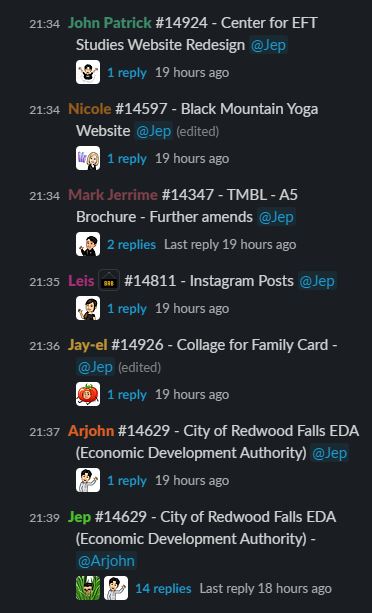
Always use the ticket number and name when you are tagging someone regarding a ticket.

  • ex. #11904 – App icon design – Name of your QA/AM/TL that you will direct your question

Create a thread for it to avoid unnecessary clutter in your squad channels. In the example below, Jep is the Quality Analyst (QA)
Who to Tag?

Each squad has a different AM or QA assigned. You can meet your QA and AM once you are assigned to a squad.


Account Managers

  • If there are missing or broken links in your ticket
  • If the ticket says there’s an attachment but there’s no file attached to it.
  • Ask for an update on your client’s tickets.
Quality Analysts
  • If you are not sure what dimensions to use for the ticket
  • If you are not sure of what branding to use for the ticket
  • If you want to clarify ticket’s instructions
  • Technical issues
Team Leader
  • Technical issues
  • If you think you can’t work on a particular ticket
  • If you have software, hardware, electricity, and/or internet issues
  • You can also talk to the Team Leader if you have personal problems that can affect your work here in DD.